Incident log template, with a monthly summary and filled examples
A free incident log template in Excel, with drop-downs, a monthly summary by type, overdue action flags and 12 filled example rows from a hotel.
An incident log is the running list of every incident at a site or across an organization: one line each, in date order, with what happened, how serious it was, what is being done about it and whether that is finished. The detail of each incident lives on its report form. The log is where they are counted, followed up and compared.
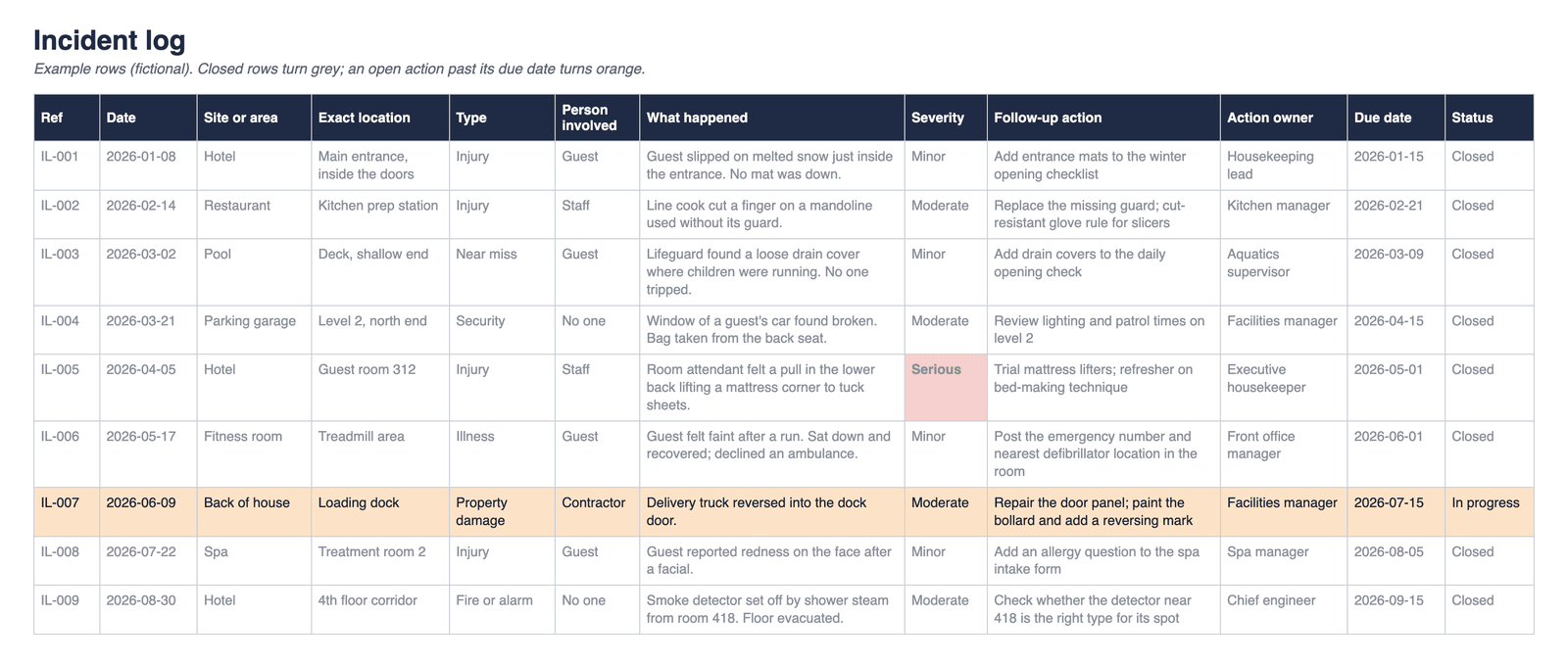
This template is a working incident log in one Excel file, set up for places where guests and staff share the same spaces: hotels, pools and spas, restaurants, event venues, attractions and senior living residences. It works in Excel, Google Sheets and Numbers. It comes with 12 filled example rows from a fictional hotel, drop-down lists, a summary that counts incidents by month and type, and highlighting for actions that are past their due date. The rest of this page explains the columns, how to keep the log, and what to look for in it each month.
What is in the file
The workbook has four tabs:
- How to use. A one-page summary of this guide, so the file makes sense on its own when it is passed around.
- Log. One row per incident, with 22 columns and room for 300 incidents. Days open works itself out. An open action whose due date has passed turns orange, a Serious or Major incident is marked red, and a closed row turns grey.
- Summary. Incidents by month and type for the year in one cell, incidents by severity and by who was involved, and counts of open, overdue and undated follow-up actions. It updates as the log changes.
- Severity and lists. What each severity level means, and the choices behind each drop-down. Rename a choice here and the drop-down follows.
The example rows are fictional. They show how a filled log reads, from a guest’s slip at a snowy entrance to a delivery truck backing into a dock door, and they should be deleted before the log is used.
Incident log or incident report: which is which
The two are often confused, and a log that tries to be a report ends up as neither.
The incident report is the full record of one incident: what happened in detail, the names of the people involved and of witnesses, injuries and treatment, a sketch or photos, and signatures. It is filled in once, by the person who saw or dealt with it, and it often holds personal and medical information. The free incident report form is one.
The incident log is a list of all of them. Each line is short enough to read in a meeting. It is the place to see that the same thing keeps happening at the pool, that three actions are overdue, or that near misses dropped off when a supervisor left. It points to the report in the Full report ref column rather than copying it.
Keep names out of the log. A log gets printed, emailed and pinned up far more often than reports do, and the report is where personal details belong.
The columns, and what each is for
Ref. A permanent number such as IL-014. Incidents get mentioned in emails, meeting notes and claims, and a number survives a change of wording. Never reuse one.
Date and time. When the incident happened, not when it was logged. The Summary counts by this date.
Site or area, and exact location. The property or department, then the spot: “Pool, deck, shallow end”. The exact location is what shows a pattern. Five slips “at the hotel” say little; five at the same entrance say where the mat should go.
Type. One of injury, illness, near miss, property damage, security, fire or alarm, spill or environmental, or other. Pick the one that best describes the event. A guest who slips and breaks a glass is an injury, not property damage.
Person involved. Guest, staff, contractor, visitor, member of the public, or no one. This is a category, not a name. Staff injuries and guest injuries usually go to different places afterward (workers’ compensation for one, the insurer for the other), so the log needs to tell them apart at a glance.
What happened. One or two plain sentences: who, what, where. “Line cook cut a finger on a mandoline used without its guard.” Not a judgment and not a cause, which comes later.
Injury or damage. What the harm was, in a few words. Blank for a near miss.
Severity. Minor, Moderate, Serious or Major, using the definitions on the Severity and lists tab. The template’s wording is a starting point for a mid-sized operator; agree on it before scoring anything, so two supervisors would rate the same event the same way.
Treatment. None, first aid, medical treatment, hospital, or not known. Together with severity, this is what most outside reports ask about.
Immediate action. What was done on the spot to make the area safe or look after the person: “Area closed, cover secured”. This is not the fix. It is the first response.
Reported by. The role of the person who reported it, such as “Lifeguard” or “Night manager”.
Full report ref. The number of the incident report, near miss report or investigation that holds the details.
Reported outside. Whether the incident went to a workers’ compensation board, a safety regulator, an insurer, the police or the fire service. It is a reminder column, not a decision tool: whether an incident must be reported outside depends on the jurisdiction and the policy, and the regulator’s own rules decide it.
Follow-up action, action owner and due date. What will stop it happening again, who is responsible, and by when. Every row gets one, or a note that none is needed and why (“Handled on the spot”). An action without an owner and a date is the most common way a log fills up with incidents that never get fixed.
Status and date closed. Open, in progress or closed. Close a row only when the action is done, and fill in the date.
Days open. Worked out from the incident date and the date closed, or today’s date while it is still open.
Risk ID. If the organization keeps a risk register, the ID of the risk this incident belongs to, such as R-01. It is what lets incidents be counted against the risks they were supposed to be controlled by.
How to keep the log
- Add the row the same day the incident is reported, even with gaps. A blank is better than a guess, and a row added a week late is often never added.
- Log near misses as well as incidents. CCOHS describes a near miss as an event that could have caused harm but did not. They cost nothing and they show where the next injury will come from. A log with no near misses usually means they are not being reported, not that none happened. The near miss report form is built for them.
- Use one log per organization, not one per site. Add the site in its column and filter. Separate files drift apart, and nobody can see that the same thing is happening at three properties.
- Give one person the job of keeping the log tidy. Others can add rows, but someone checks each week that every row has an action, an owner and a date.
- Go through it at a regular meeting. Sort by status, look at the orange rows first, and close what is done.
- Investigate the serious ones properly. The log records that an investigation is needed and points to it. The incident investigation form covers the five whys, contributing factors and the corrective action plan.
What to look for each month
The Summary tab answers most of these without a pivot table:
- The same place, more than once. Sort the log by exact location. Two slips at one entrance in a winter is a mat problem, not bad luck.
- Rising counts of one type. Compare this month’s row with the last three. One month is noise; three in a row is a trend.
- Overdue actions. The Summary counts them and the Log shows them in orange. An action that keeps slipping usually needs a different owner or a smaller first step.
- Few near misses. If near misses are a small share of the total, reporting is the problem to solve first.
- Serious incidents with a minor-looking cause. A back strain from making a bed (example row IL-005) is a sign the task needs changing, not just a reminder to lift carefully.
- Incidents that fit no risk. If an incident has no risk ID because nothing in the risk register describes it, the register is missing a risk.
Records the law may require
An internal incident log does not replace any form a regulator or workers’ compensation board requires, and those duties vary by province, state and country. Two examples show how specific they can be:
- British Columbia. WorkSafeBC’s Occupational Health and Safety Regulation (section 3.19) requires employers to keep a record at the workplace of all injuries and exposures to contaminants that are reported or treated. First aid records must be kept for at least three years, kept confidential, and be available for inspection by a WorkSafeBC officer.
- United States. OSHA says many employers with more than 10 employees must record work-related injuries and illnesses on its Forms 300, 300A and 301, or equivalent forms, with some industries exempt. OSHA’s forms page says equivalent forms can be kept in any file format, including Excel, as long as they meet the requirements in its rules. This template is not one of those forms as it stands, and does not have their columns.
Elsewhere, check the workers’ compensation board or safety regulator for the province or state before relying on any log, this one included, as the required record.
When a spreadsheet stops being enough
A spreadsheet log works for one site, a few dozen incidents a year and one person who keeps it tidy. It gets harder as the organization grows. Reports arrive on paper or by email and someone has to type them in. Nobody is reminded when an action is due. Copies drift between sites. And the log only knows what someone remembered to add.
Riskr is incident management software built around that problem. Staff report incidents on a phone or a computer using the same forms at every site, and each report records the site and location where it happened. Each incident is assigned to the person responsible, and everyone involved can see its status. Each corrective action has an owner and a due date, and stays open until it is done. Every step is logged, from the first report to the final decision, and a summary can be shared with leadership, auditors or insurers. Every incident reported through Riskr is linked to a risk in its risk register, so a risk rated unlikely that keeps happening shows up. See how Riskr handles incident management.
The template on this page stays free to use either way. Keeping a log in a spreadsheet for a season is also a good way to learn which columns, types and severity levels matter before moving them into software.
Sources
- Canadian Centre for Occupational Health and Safety (CCOHS), Incident Investigation
- WorkSafeBC, OHS Regulation Part 3, section 3.19 First aid records
- Occupational Safety and Health Administration (OSHA), Recordkeeping
- Occupational Safety and Health Administration (OSHA), Recordkeeping Forms 300, 300A, 301
- Riskr, Incident management
- Riskr, Risk management